Trading System Engineering / Manual Execution
SPXW 0DTE Console — Keyboard-Driven Manual Execution
In operation
A full tour of the panel: what every key does, what every screen region shows, and the machinery underneath — an explicit state machine as the single order-submission site, broker-truth position accounting, active-chase closes, hard and soft stop layers, an audit trail built to reconstruct any session, and a one-key post-market report.
What it is
The SPXW 0DTE Console is a keyboard-driven manual execution panel for SPX Weekly (SPXW) same-day-expiry options, trading through Interactive Brokers TWS. There is no strategy and no signal in it, by design: a human decides, presses a key, and the software’s only job is to make that decision execute correctly — or refuse it by rule. The stack is deliberately plain: a Python asyncio backend using ib_insync, a single-file React front end delivered over WebSocket with zero build step, and SQLite for persistence.
This is the v2, built against the v1 panel’s first operating week: twelve pull requests, six of them substantive fixes in the same layer — order and execution state. Local position state drifted from broker truth; execution logic was a tangle of interacting flags; a crash lost all in-flight intent because nothing persisted; and the IOC-plus-local-timeout close model fought TWS’s server-side price management. Rather than a seventh patch, the layer was redesigned around three commitments: an explicit state machine, broker truth as the only position authority, and persistence of intent — with every v1 lesson carried over as a structural invariant rather than a memory.
The screen, top to bottom
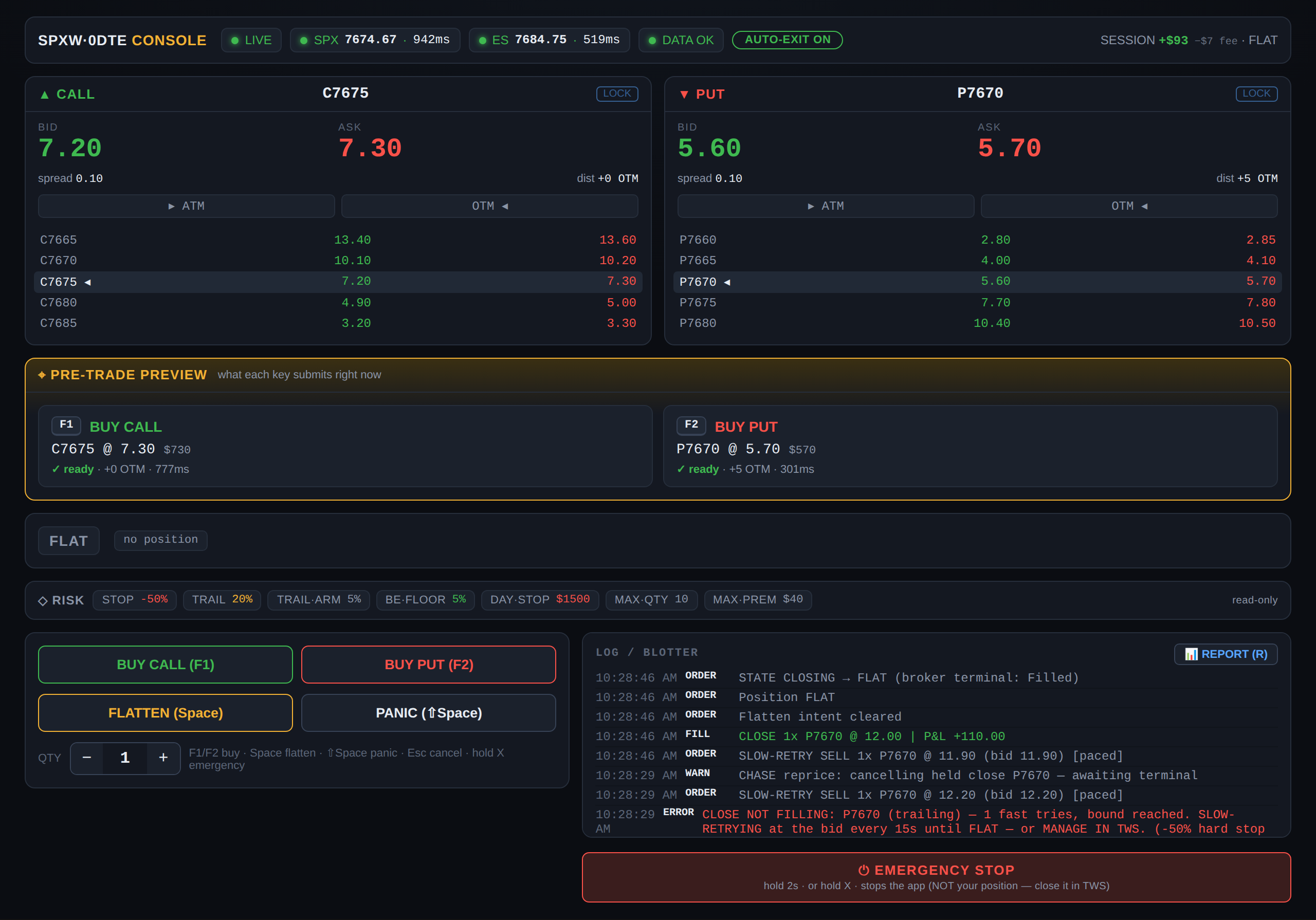
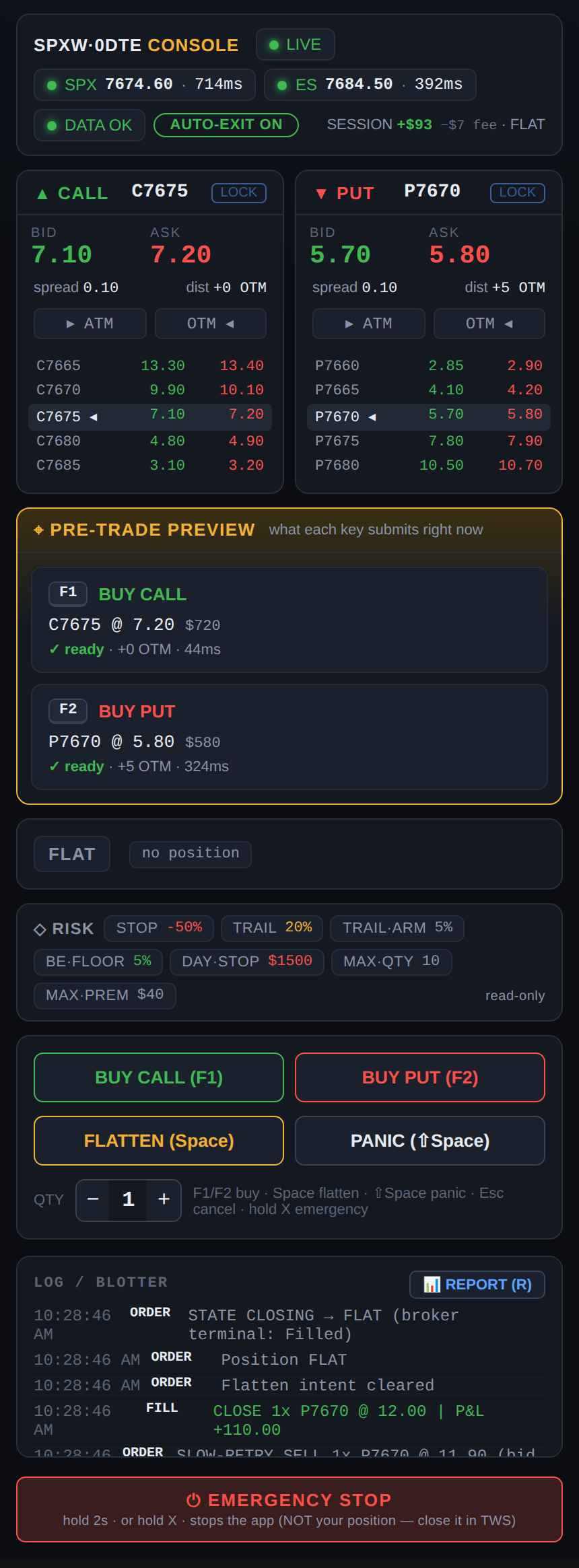
The layout is built for scan order under time pressure — five zones, most important first.
Status bar. Connection mode (LIVE or DEMO), SPX and ES spot prices each with its own tick age in milliseconds, data-farm health, the AUTO-EXIT toggle state, and session P&L with fees broken out, next to the current execution state.
Strike panels. Call on the left, put on the right. Each panel auto-targets the first out-of-the-money strike, shows big bid/ask with spread and distance-to-spot in points, and a deliberately small ladder of ±2 strikes around the target — v1’s twenty-row ladder was cut because only the at-the-money region ever gets traded. LOCK pins the target to a strike; ATM/OTM nudge buttons move it one step either way.
Pre-trade preview. The panel’s signature addition: a pane that continuously shows what each key would submit right now — exact contract, limit price, dollar cost, quote age, and a safety verdict. Green means ready; a red verdict names the blocker (in-the-money strike, stale quote, premium cap exceeded) and the key will be refused. It exists because of a specific incident: a frozen data feed once kept reporting a stale SPX spot, the strike selector chose an in-the-money contract, and nothing on screen made that visible before the buy. A pane that renders the consequence of a keypress catches that whole class of error before it happens.
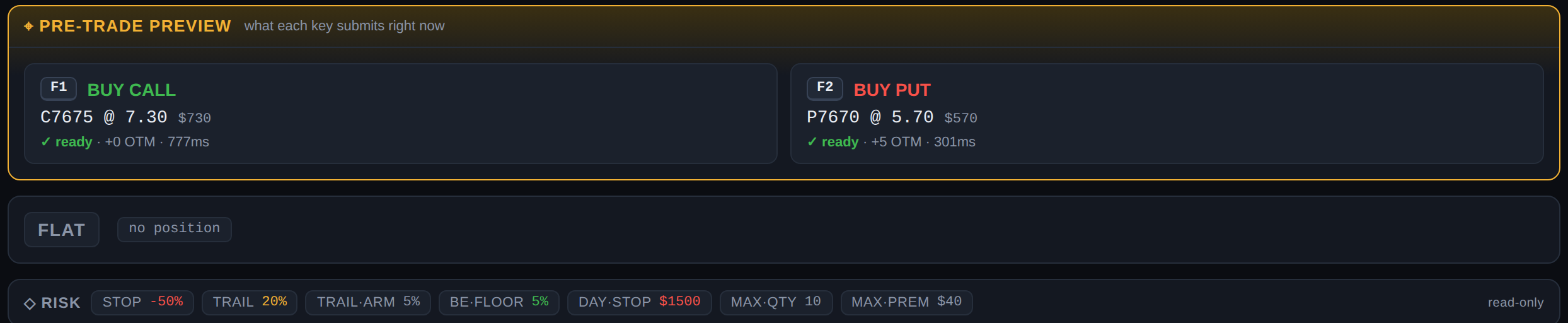
Position strip. Execution state, position, average price, and unrealized P&L — or simply FLAT.
Risk strip. A read-only display of every protection currently armed: the −50% hard stop, the trailing stop with its arming threshold, the breakeven floor, the daily-loss stop, and the quantity and premium caps. When the soft stops are toggled off, the suppressed items render struck-through — the panel never displays a protection that is not actually in force.
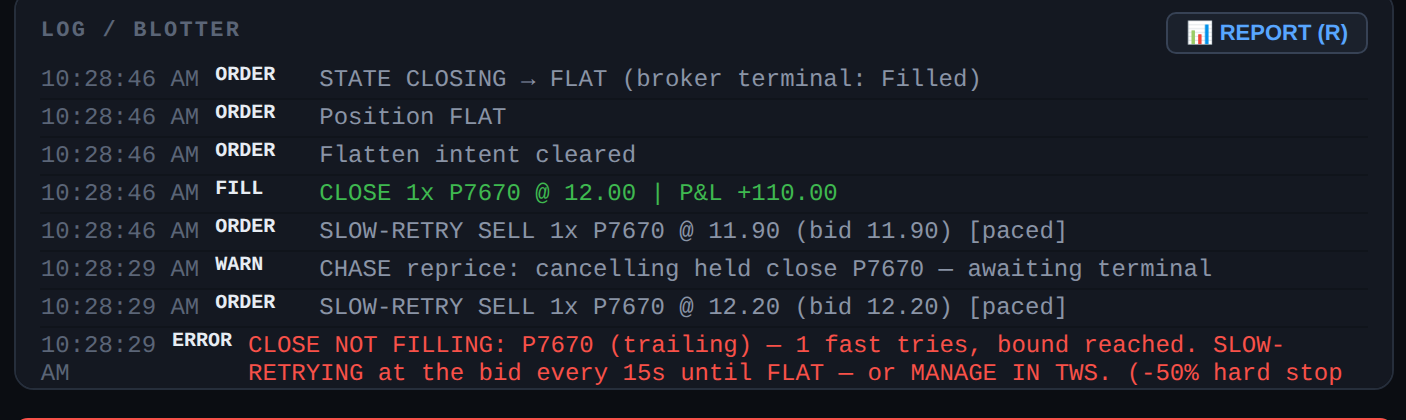
Controls and log. Clickable buttons mirror the keys for touch use, next to a quantity stepper. The log/blotter streams every state transition, order, fill, and warning in real time, newest first, each with a reason. An EMERGENCY STOP bar sits at the bottom.
The keyboard
| Key | Action |
|---|---|
F1 / F2 | Buy call / buy put at the previewed strike. Holding a position, a same-side press scales in — pinned to the held strike, never the drifted target. An opposite-side press is refused (one-direction rule). |
Space | Flatten: close the position via an active price chase until flat. |
Shift+Space | Panic close — same chase, maximum urgency. |
Esc | Cancel an in-flight opening order. |
A | Toggle AUTO-EXIT (the soft stop layer; see below). |
R | Generate and open today’s session report. |
hold X (2 s) | Emergency stop. Deliberately kills the app, not the position — if the software must die, closing belongs in TWS, not in the software being distrusted. |
The execution machinery
Underneath the panel is an explicit state machine — FLAT → OPENING → LONG → CLOSING → FLAT — and it is the only place in the codebase that submits orders. Every transition is logged with a reason and is idempotent: duplicate commands in OPENING or CLOSING are refused by the state itself, not by scattered flags.
Four mechanisms carry most of the safety weight:
- Held-guard-until-terminal. A local timeout only requests a cancel; the in-flight guard is held until the broker reports a terminal status. An immediate-or-cancel order can still fill seconds after the cancel request — releasing early and re-sending is how a naked short happens, so the guard makes it structurally impossible.
- Closes are an active chase, one order in flight. The close rests at the bid and is repriced to follow the market — but only after the broker confirms the previous order terminal, so a double-sell cannot exist. Pricing stays inside IB’s server-side price band (no negative padding, which gets orders held for seconds). If a fast chase exhausts its bounded attempts, the panel drops to a paced slow retry at the bid every 15 seconds until flat, tells the operator to manage in TWS if preferred — and keeps the hard stop armed underneath the whole time.
- Broker truth, continuously. Position and execution events from the broker are reconciled against local state on every change, not just at reconnect; drift is corrected and alerted. A broker state the single-position model cannot express — a short, a multi-leg position, a foreign contract class — locks opening in a BLOCKED sub-state and calls for a human.
- Write-through persistence. The state machine’s state, the position, and latched intent (a triggered stop, an engaged end-of-day flatten, a tripped kill-switch) hit SQLite on every transition. After a crash or restart the console restores its intent first, then reconciles against the broker — broker wins on position, intent survives.
The risk engine: hard and soft layers
Protections are split into two layers with different authority.
The hard layer cannot be disabled from the panel: a −50% hard stop on the position, a daily-loss kill-switch that force-flattens and locks the session, and end-of-day flattening with a reopen-after-EOD lock. The soft layer — the trailing stop with its arming threshold, and a breakeven floor that exits a faded winner near flat instead of letting it round-trip into a loss — sits behind the AUTO-EXIT toggle (A), for days when the operator wants manual exits. The toggle’s asymmetry is the point: turning soft stops off leaves every hard protection armed, and the risk strip shows exactly what is suppressed.
Two freshness rules govern all of it. Stops act only on fresh quotes — a stale or bid-less market produces a rate-limited degraded-stop warning instead of an action, on the principle that no action is safer than an unsafe one. And opens are gated on the age of the SPX spot rather than on the feed’s live/delayed flag, because that flag never downgrades once live — a frozen feed reads “live” forever. Every risk action latches its intent and goes through the same state-machine path as a manual close; there is no side channel that submits orders.
Observability
Each session writes two files: a human-readable application log and a structured events stream (JSON Lines, Eastern-time timestamps), fed through a queue so logging never blocks the order path. Every command records the SPX spot, the selected strike, its distance from spot, the quote age, and — on refusal — a reason code, so any decision can be reconstructed later. Fills land in a SQLite blotter.
Every session is also stamped with a provenance record: a session id plus a hash over the superset of behavior-affecting configuration. Logs from different days can be pooled for later study without ever silently mixing two configurations — and the paper/live flag travels with every record.
The post-market report
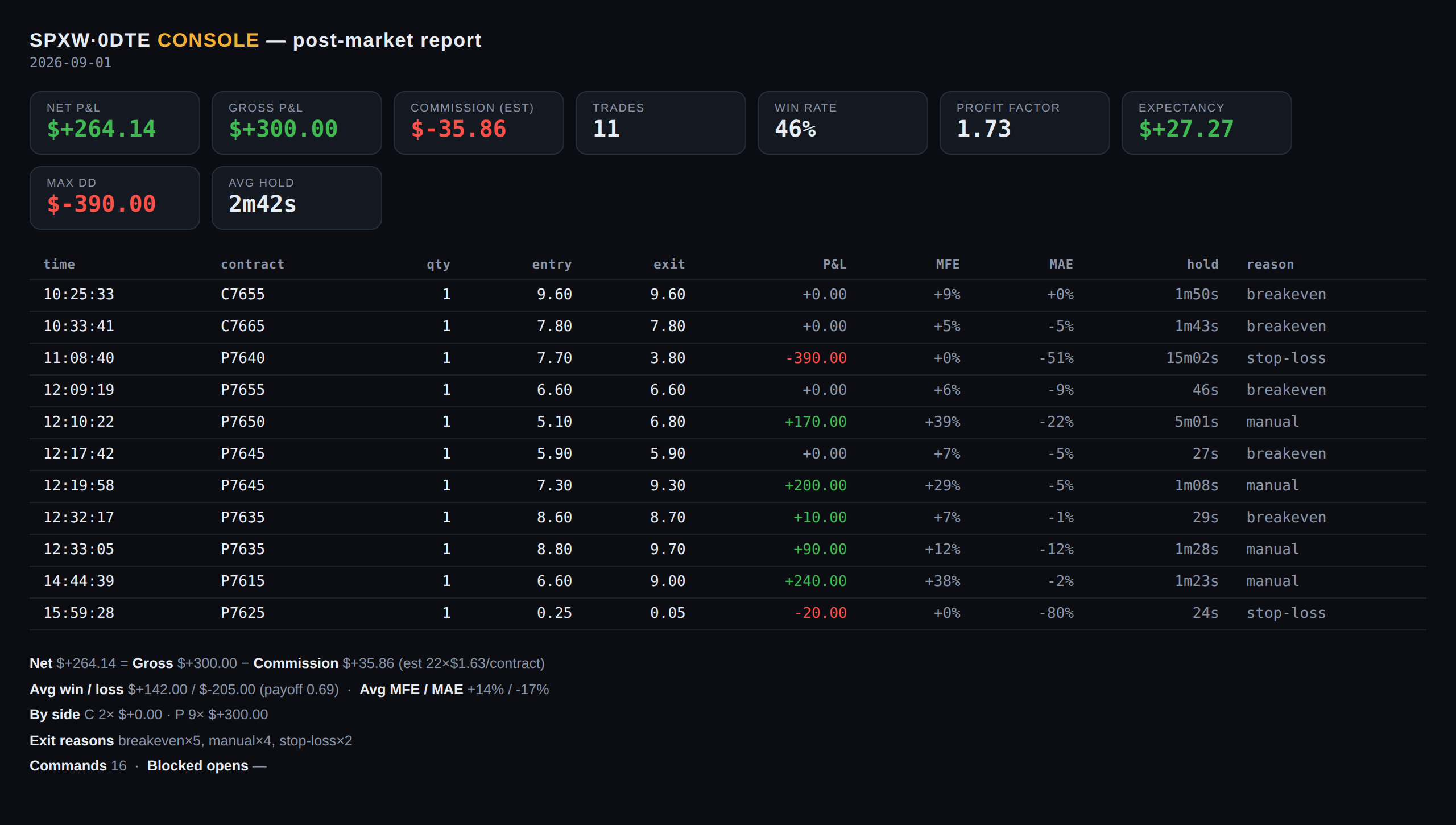
The audit trail earns its keep after the close. One key (R), the REPORT button, or one command (python -m console.report) turns the day into a styled report, generated from the same two audit sources everything else uses: the SQLite blotter for closed trades and the events stream for commands, blocks, and risk actions. It works intraday too — pressed mid-session, it reports the completed trades so far — and every generation saves a dated HTML copy alongside the day’s logs, so the archive builds itself.
The header tiles give the day at a glance: net and gross P&L with the estimated commission broken out, trade count, win rate, profit factor, expectancy, max drawdown, and average hold time. Below them, every completed round trip appears with its entry and exit prices, P&L, MFE and MAE (the furthest the trade went in your favor and against you), hold time, and the exit reason — the same reason codes the risk engine logged when it acted: breakeven, trailing, stop-loss, EOD, or plain manual. The footer aggregates the rest: average win versus average loss and the payoff ratio, per-side totals, exit-reason counts, and how many opens the safety gates refused.
Because the inputs are the append-only audit files, the report can be regenerated for any past date and always agrees with what the logs actually recorded — the review loop closes on the same evidence the session wrote.
What was deliberately cut
Three v1 features were removed on purpose. Real-time Greeks: nobody reads a Greeks matrix while manually timing an entry, and it cost an IV solver plus most of the performance budget — distance-to-ATM in points plus the spread carries the decision. The mini-chart: real charts live in TWS on another screen. And the one-key flip (flatten-and-reverse): the single most dangerous key on the old panel became two explicit steps.
The same taste applies to the runtime: no Rust, no compiled hot path. The failures that motivated the rewrite were state-machine correctness bugs, not throughput — a 50 ms snapshot loop was never the bottleneck, and the engineering budget went to the state machine, persistence, and reconciliation instead.
Modes and resilience
The console runs against a paper or live TWS endpoint by configuration, and the active mode travels as a flag on every log record; the status-bar badge separately distinguishes LIVE (real market data) from DEMO (synthetic). A --demo mode drives the full panel — including the complete buy/close flow — from synthetic quotes with no TWS at all, for off-hours familiarization. If today’s option chain is unavailable (holiday, after-hours), the panel starts degraded instead of crashing: it comes up, shows its status, and refuses to trade. The front end is a responsive single file and an installable PWA (inline manifest, standalone display), so the same panel works on a phone on the same network.
Engineering status
The engine is complete through all planned phases and carries 258 tests — unit, integration, adversarial broker simulations (late fills, price-band rejections, disconnects, partial fills, induced drift), and crash-recovery drills — under a PR-per-change workflow. Twelve non-negotiable safety invariants, each annotated with the dated incident that produced it, gate every change to the execution layer. The console has been in daily use since late July 2026, with the v1 panel retained as a fallback.